Integrate as a platform
Add one middleware in front of the routes agents call. It verifies the full chain of agency in one round trip and fails closed — so you can accept agent-originated volume you'd otherwise reject as fraud.
Install & get keys #
Sign up at api.writhq.com/signup — platform name, email, and password. You get a plt_… id, an API key shown exactly once and stored only as a SHA-256 hash, so it can be rotated but never read back — not by you, not by support — and a login to the platform console. The key is your platform identity regardless of whether you hold an account: it authenticates your server-to-server calls to /v1/verify and scopes your decision log. There is no activation step; the key works on the next request. A confirmation link is emailed to you and it gates nothing — not the key, not the quota, not a single route. Confirming only clears a banner in the console and tells us we can reach you about an outage or a password reset; resend it any time with POST /v1/auth/verify-email. Same thing over the API:
curl -s -X POST https://api.writhq.com/v1/auth/signup \
  -H "content-type: application/json" \
  -d '{"platform_name":"My Platform","email":"[email protected]","password":"…"}'
# → 201 {"account":{"id":"acc_…"},"platform":{"id":"plt_…","api_key":"plt_sk_…","plan":"free"}}Don't want an account? POST /v1/signup is the original endpoint — platform name and email, nothing else — and still works exactly as before, returning a key with no account attached:
curl -s -X POST https://api.writhq.com/v1/signup \
  -H "content-type: application/json" \
  -d '{"name":"My Platform","email":"[email protected]"}'
# → 201 {"id":"plt_…","api_key":"plt_sk_…","plan":"free", …}That's a fully supported steady state — nobody is forced to make an account, and a key created this way authenticates identically to one created through the account flow. Decide later that you want the console? Log in, create an account, and POST /v1/account/claim/platform {api_key} — claiming binds the platform to your account without changing, rotating, or invalidating the key; everything already deployed against it keeps working. A platform already claimed by a different account can't be re-claimed, even by someone holding the key (409).
New platforms start on the free plan — 1,000 verifications per calendar month, every feature included. See Plans & quotas. Then install the middleware:
npm i @writhq/verifyThe package ships requireKYA (Hono), requireKYAExpress (Express), and the framework-agnostic evaluateRequest + KYAClient for everything else. Set PLATFORM_API_KEY and PASSPORT_URL in your environment, or pass apiKey / passportUrl explicitly. PASSPORT_URL defaults to the hosted passport at https://api.writhq.com; point it at http://localhost:3000 when you want the local stack instead.
The requireKYA middleware #
Guard a route by naming the action it performs. The middleware reads the X-Passport header, calls verify, and either attaches the resolved chain to the request or short-circuits with a deny / 403. Roughly ten lines to integrate:
import { requireKYA } from "@writhq/verify";

// Accept agent traffic — one round trip, fails closed.
app.post(
  "/api/refill",
  requireKYA({
    action: "account.refill",
    // bind the REAL amount (minor units) into the verify call
    amount: async (c) => {
      const body = await c.req.json().catch(() => ({}));
      return Number(body.amount_minor ?? 0);
    },
  }),
  async (c) => {
    const { chain, verification_id } = c.get("kya");
    await accounts.refill(await c.req.json());
    return c.json({ ok: true, principal: chain.principal });
  }
);The amount resolver is required and returns minor units. The middleware binds it into the verify call, so the passport enforces per-tx and period caps against the real amount — never a client-declared one.
Options #
| Option | Type | Description |
|---|---|---|
| action | string | Required. The scope action this route performs, e.g. account.refill. |
| amount | (ctx) => number | Required, except on a document.* route that supplies document. Resolver for the transaction amount in minor units. |
| document | (ctx) => DocumentContext | Signature authority only (document.* actions). Resolver for the document this route would sign — document_hash, document_class, counterparty, liability_minor. See Signature authority. |
| currency | string | Expected currency. Defaults to "USD". |
| onboardingUrl | string | Where blocked/anonymous traffic is sent to get a passport. Defaults to {passportUrl}/onboarding. |
| passportUrl | string | Base URL of the passport service. Defaults to env PASSPORT_URL, else https://api.writhq.com. |
| apiKey | string | Your platform API key for /v1/verify. Defaults to env PLATFORM_API_KEY. |
There is no failOpen. The middleware always fails closed — a missing header, a deny, or an unreachable passport all block the request. To customize the deny response, wrap the framework-agnostic evaluateRequest instead of the adapter.
The 403 "KYA required" block page #
When a request arrives with no X-Passport header — an anonymous agent — the middleware never runs your handler. It returns a structured 403 with an onboarding link, so rejected traffic becomes a lead instead of a dead end.
{
  "error": "KYA required",
  "message": "This action requires a verified agent passport.",
  "reason": "missing_passport",
  "onboarding_url": "https://api.writhq.com/onboarding"
}Point onboarding_url at your co-branded onboarding flow. The funnel:

anonymous → 403 → onboard → mandate → verified buyer.Verify API #
The middleware calls this for you, but here is the raw contract for custom integrations. One round trip.
Request — Authorization: Bearer <your platform API key> (the key is your platform identity — you never declare platform_id yourself), plus the raw agent assertion and the context you are about to execute:
{
  "assertion": "<JWS signed by the agent key>",
  "action": "account.refill",
  "amount": 50000,
  "currency": "USD"
}Response — a decision, the resolved chain (attributes only), a verification id, and a signed receipt:
{
  "decision": "allow",
  "reason": "ok",
  "chain": {
    "principal": { "type": "individual", "country": "US",
                    "kyc": "verified", "accredited": true },
    "agent": { "id": "agt_9f…", "name": "treasury-bot", "runtime": "claude-code" },
    "mandate": { "id": "mnd_tr7…", "remaining_this_period": 150000 }
  },
  "verification_id": "vrf_9c1…",
  "receipt": "<JWS signed by passport>"
}You receive attributes — KYC level, country, an accreditation flag — never the principal's identity documents, unless the mandate grants disclosure or a lawful request compels it. Subject access, correction, and dispute flows are first-class and FCRA-shaped.
The check pipeline #
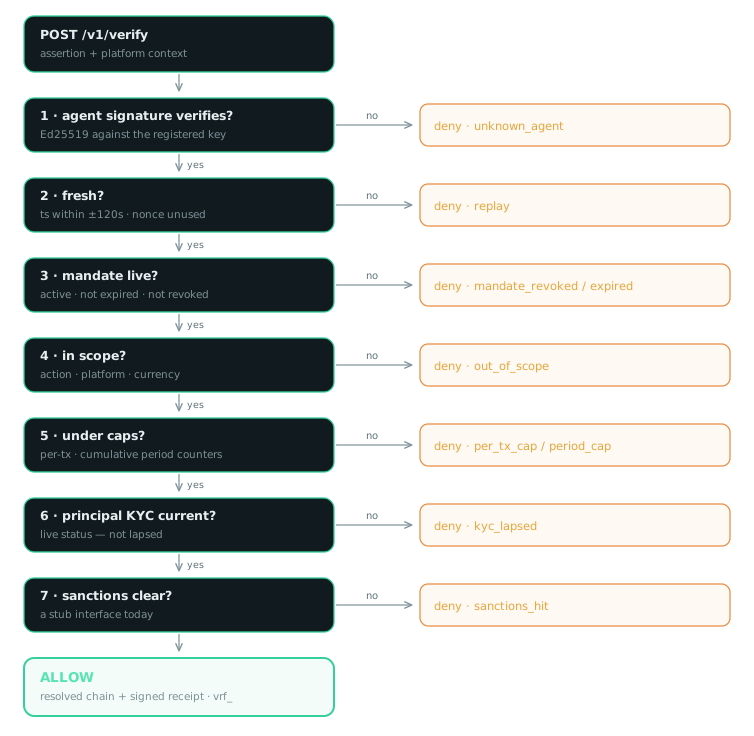
On every verify the passport runs, in order — first failure decides:
- Agent signature — the assertion verifies against the registered agent public key.
- Replay — timestamp within a ±120s window and the nonce is single-use.
- Mandate liveness — active, not expired, not revoked (a live check — revocation is instant).
- Scope — the mandate covers this action, amount, and platform. For a
document.*action the scope must also cover this document's class, or the decision isdocument_class. - Period counters — cumulative spend this period stays under the cap (we maintain the counters).
- KYC status — the principal's KYC has not lapsed.
- Sanctions — screen passes (a stub interface today).
Decision reasons #
document_class belongs to signature authority (document.sign): the mandate covers document signing, but not paper of this class. A mandate with no document authority at all denies scope_not_found instead.
allow always carries ok. Any other reason accompanies a deny. Treat a reason you don't recognize as a deny — the set can grow.
Nothing in this list is about billing. A 429 quota_exceeded is a limit on your account, carries no decision, and belongs to Plans & quotas instead.
Signature authority #
The same chain answers a second question: your agent signed it — was it authorized? Actions in the document.* namespace assert signing authority instead of spending authority. Writ attests the authority; it never produces the signature. Your e-signature platform still makes it, and none of this is a qualified electronic signature (eIDAS/QES).
Gate a signing route the way you gate a payment route — a document resolver replaces amount, because a signing call states its number once, as liability_minor:
app.post("/api/sign",
  requireKYA({
    action: "document.sign",
    document: async (c) => (await c.req.json()).document,
  }),
  handler,   // only runs when the agent had the authority; fails closed
);The document block travels in the agent's signed assertion and in your verify call. If they differ, the decision is context_mismatch. We never receive the document — only its SHA-256.
{
  "document_hash": "<lowercase hex sha256 of the document bytes>",
  "document_class": "nda",        // nda · msa · sow · order_form · dpa · other
  "counterparty": "Northbank Sandbox",
  "liability_minor": 2500000     // $25,000 of exposure
}A signing mandate names the classes of paper the agent may sign, and re-reads the familiar caps as liability caps — max_amount_per_tx per document, max_amount_per_period cumulative. Same cap engine, same server-side counters as payments; only the unit changes.
{
  "action": "document.sign",
  "document_classes": ["nda", "order_form"],
  "max_amount_per_tx": 5000000,       // $50,000 per document
  "max_amount_per_period": 20000000,  // $200,000 a month
  "period": "month",
  "currency": "USD",
  "platforms": ["plt_…"]
}Three ways it stops: the wrong class of paper denies document_class, one document over the per-document cap denies per_tx_cap, and too much cumulative exposure denies period_cap. The hash, class, counterparty and liability are bound into the signed receipt and into your decision log, so the record names the exact paper — on denials too.
UETA §14 and ESIGN already recognise contracts formed by electronic agents, and agency law binds a principal only within the authority granted. This is the record of that authority.
Countersigning #
After you execute the action, countersign the verification. A record signed by both sides — the passport's receipt plus your platform key — is nearly incontestable. This is the evidence-layer law, on from day zero.
Sign the claims {verification_id, decision, platform, platform_ref, ts} with your platform key and post the compact JWS. Put your countersigning public key on file first — POST /v1/platforms/self/key with your API key, no operator in the loop — because the passport verifies the countersignature against it, and rejects one that verifies but whose claims name a different verification or platform.
{
  "countersig": "<JWS signed by your platform key>"
}
// → { "id": "vrf_9c1…", "countersigned": true,
// "countersigned_at": "…", "both_signed": true }Audit export #
Every decision is an immutable, signed vrf_… record. Export the log for reconciliation, dispute handling, or compliance review:
Send Authorization: Bearer <your platform API key>; limit maxes out at 1000. The export is scoped to the calling key — your key returns only your platform's records, and cannot countersign another platform's verification. Log in to the platform dashboard for the same decision log with one-click JSON export and named API-key management alongside it.
Plans & quotas #
Plans meter verifications per UTC calendar month and nothing else. Every plan carries every feature — mandates, caps, revocation, countersigning, audit export, signature authority. The plan buys volume; nothing about the decision procedure changes with the tier. Every verification counts, allow and deny alike — a deny is the product working.
| Plan | Price | Included |
|---|---|---|
| free | $0 | 1,000 verifications a month. What every new signup starts on. |
| growth | $99 / month | 100,000 verifications a month. Upgrade yourself from the platform dashboard — Stripe Checkout, no sales step. A hard ceiling, not metered overage: you are never surprised by a bill. |
| above that | talk to us | Volume pricing or a regional deployment: [email protected]. |
Once the month's allowance is spent, /v1/verify stops answering and returns 429:
{
  "error": "…",
  "code": "quota_exceeded",
  "quota": { /* the limit, what you've used, when it resets */ },
  "upgrade": { /* where to get more */ }
}
// note what is NOT here: no "decision", no "reason", no "chain", no receiptThis distinction matters more than any other on this page. A deny is Writ's signed answer to "did this agent have the authority?" — HTTP 200, a decision, a reason, a receipt. A 429 quota_exceeded is an answer about your own billing account, formed before the assertion is even read: no verification happened, so there is no decision and no signed record. That is why the body carries no decision field at all — a client that switches on body.decision cannot silently mistake one for the other.
So: do not record it in your own logs as a deny, do not show the caller a KYA failure, and do not let it fall through into executing the action unverified. Handle it like any other billing-side outage — hold the action and retry, or route it to your manual path. The middleware still fails closed, so the request blocks either way; what you must not do is attribute the block to the agent.
Your platform record #
The platform console is login-first once you have an account: your platforms, plan + usage meter, named-key management, the decision log with JSON export, Stripe upgrade / manage-billing, and an account activity log (logins, claims, key create/revoke). Pasting a key still works there too, but it's now an explicitly read-only fallback view for platforms with no account attached. The same account facts are available at GET /v1/auth/session, authenticated by the session cookie, which returns the account plus the platforms and principals it owns.
Key-level facts are also available over the API, authenticated with any of your platform's keys:
Returns your plan, this month's usage, and billing state. Cheap enough to poll on a schedule if you want to alert before you hit the ceiling rather than after.
Named API keys
A platform can hold up to 10 active keys, each with its own label, creation time, last_used_at, and independent revocation — so a leaked or retiring key doesn't force you to rotate everyone else's. The original single key still works unchanged; the console shows it as key zero, labelled default.
GET    /v1/platforms/self/keys
POST   /v1/platforms/self/keys                 { "label": "…" }
PATCH  /v1/platforms/self/keys/:keyId          { "label": "…" }
POST /v1/platforms/self/keys/:keyId/revokeAll four are key-authed — any active key on the platform can call them, no browser needed. The session-authed equivalents the console itself uses live under /v1/account/platforms/:id/keys…, for callers who are logged in instead of holding a key.
last_used_at only moves on a verification call — /v1/verify and the like — never on a dashboard read. That's what makes it trustworthy evidence for "is anything in production still using this key" before you revoke it.
A revoked key fails immediately: the very next request authenticated with it — including a call to /v1/verify — gets 401.
Rotates whichever key authenticated the request. Call it with the original key and it rotates that same column — unchanged behavior for every existing caller who only ever had the one key. Call it with a named key and that key is revoked and replaced under the same label, its siblings untouched. Either way: a new key once, old key dead immediately — there is no overlap window, because rotation exists for a key you believe is compromised and a grace period would defeat it. Write the new key to your secret store and redeploy in the same motion; roll one key at a time. Since only a hash of any key is stored, this doubles as the recovery path for a lost key: rotate, don't ask.
Not to be confused with POST /v1/platforms/self/key, which rotates the countersigning public key the passport checks your countersignatures against. Different credential, different purpose.
Billing follows the account; the subscription follows the platform
If you've created an account, the Stripe customer object attaches to it — one customer, carrying the account's email — rather than to each platform, so managing billing across several platforms doesn't mean managing several customers. The subscription itself stays per-platform, because what's sold is one platform's monthly verification quota. If your platform predates accounts, none of this changes anything for you: you keep your existing platform-level customer and keep billing correctly.